
Introduction
In today’s digital world, integrating n8n with WhatsApp has become one of the most effective ways to automate customer communication. Businesses are looking for solutions to manage their interactions faster, smarter, and without constant human intervention.
If you want to set up a WhatsApp AI Chatbot that can automatically respond to WhatsApp messages reliably and consistently, this tutorial is prepared just for you.
n8n is a powerful no-code automation tool that allows integration with various services, including WhatsApp via platforms like Whatsiplus. It lets you design intelligent and automated workflows. With n8n, you can process incoming WhatsApp messages, make logical decisions, and send appropriate responses automatically.
In this article, you will learn step by step how to integrate n8n with WhatsApp and create a simple yet practical WhatsApp AI Chatbot for automatic message responses.
Why is integrating n8n with WhatsApp important?
Integrating n8n with WhatsApp allows you to fully automate repetitive and time-consuming customer communication processes. With this integration, a WhatsApp AI Chatbot can receive user messages, analyze their content, and automatically send appropriate responses based on predefined scenarios.
This approach not only saves significant time and support costs but also improves the user experience. Users receive faster and more accurate responses, and your support team can focus on more important tasks. Therefore, using n8n WhatsApp Integration is a key step toward professionalizing communication and increasing business productivity.
Requirements
- An active Whatsiplus service with a valid API Key (Premium Service)
- Access to n8n (Server)
- Active Webhook in n8n
Workflow overview in n8n
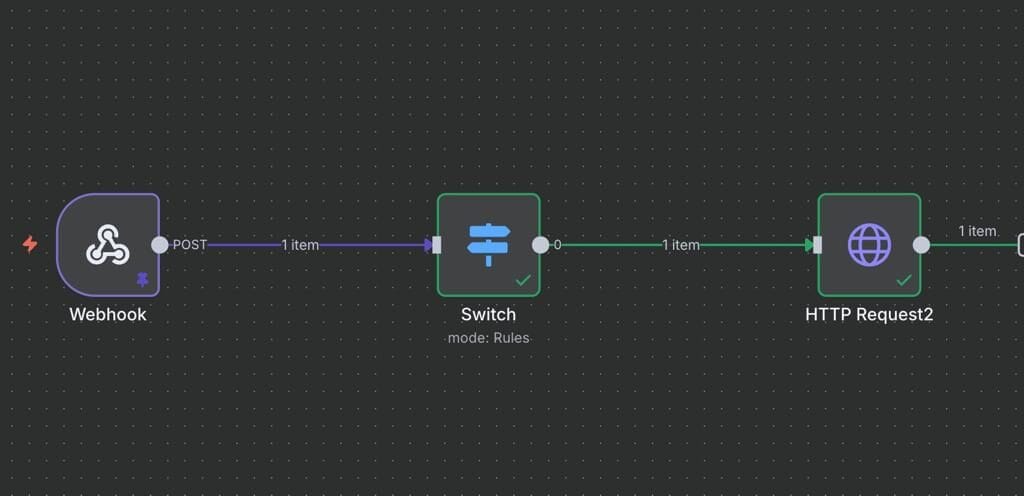
Step 1: Create a Webhook in n8n
- Log in to the n8n panel and create a new Workflow
- Add a Webhook Node
Settings:
- HTTP Method: POST
- Path: whatsiplus
Register the Webhook URL (e.g.:
https://your-n8n-domain/webhook/whatsiplus) in the Whatsiplus service settings.
Note: Make sure the “Receive Messages” option is enabled in your service settings to allow incoming messages.
Step 2: Receive WhatsApp Messages
Sample data sent from Whatsiplus:
{
  "ID": "12345",
  "Type": "chat",
  "Hash": "YOUR_API_KEY",
  "From": "447xxxxxxxxx",
  "To": "447yyyyyyyyy",
  "GroupId": "",
  "Chat": "Hi"
}
Message text:
{{$json.body.Chat}}
Sender number:
{{$json.body.From}}
Step 3: Decision Making with Switch Node
Add a Switch Node to check if the received message equals Hi.
- Value:
{{$json.body.Chat}} - Rule: Equals → Hi
Step 4: Send Automatic Response
Connect an HTTP Request Node to the output of the Switch:
- Method: GET
URL:
https://api.whatsiplus.com/sendMsg/YOUR_API_KEY?phonenumber={{$json.body.From}}&message=Hi from webhook
Step 5: Final Test
Save and activate the Workflow.
Send a Hi message in WhatsApp to receive the automatic response.
Important Notes
- HTTPS usage is mandatory
- The Workflow must always be active
- It can be extended for more advanced scenarios
Conclusion
By integrating n8n with WhatsApp, you can create a powerful WhatsApp AI Chatbot to automatically respond to messages and manage customer communication professionally, quickly, and at scale. This integration allows you to receive and process all incoming WhatsApp messages and respond according to different scenarios without complex development or time-consuming setup.
The main advantage of using n8n is that you can implement diverse logic such as conditional responses, interactive menus, automated order information, request tracking, and even integrations with other systems like CRM, WooCommerce, or WHMCS. As a result, your customer support and communication process becomes largely automated and optimized.
Additionally, one of the highly practical scenarios is connecting your WhatsApp chatbot to AI. You can send the user’s incoming messages from n8n to AI services like OpenAI, receive the intelligent response, and automatically send it to the user on WhatsApp. With this approach, your chatbot can:
- Answer user questions naturally and intelligently
- Analyze conversations and provide responses according to the user’s text
- Offer 24/7 support without human operators
Ultimately, combining n8n, WhatsApp, and AI creates a powerful solution for automating communication, increasing customer satisfaction, and reducing support costs, making it ideal for businesses of all sizes.