
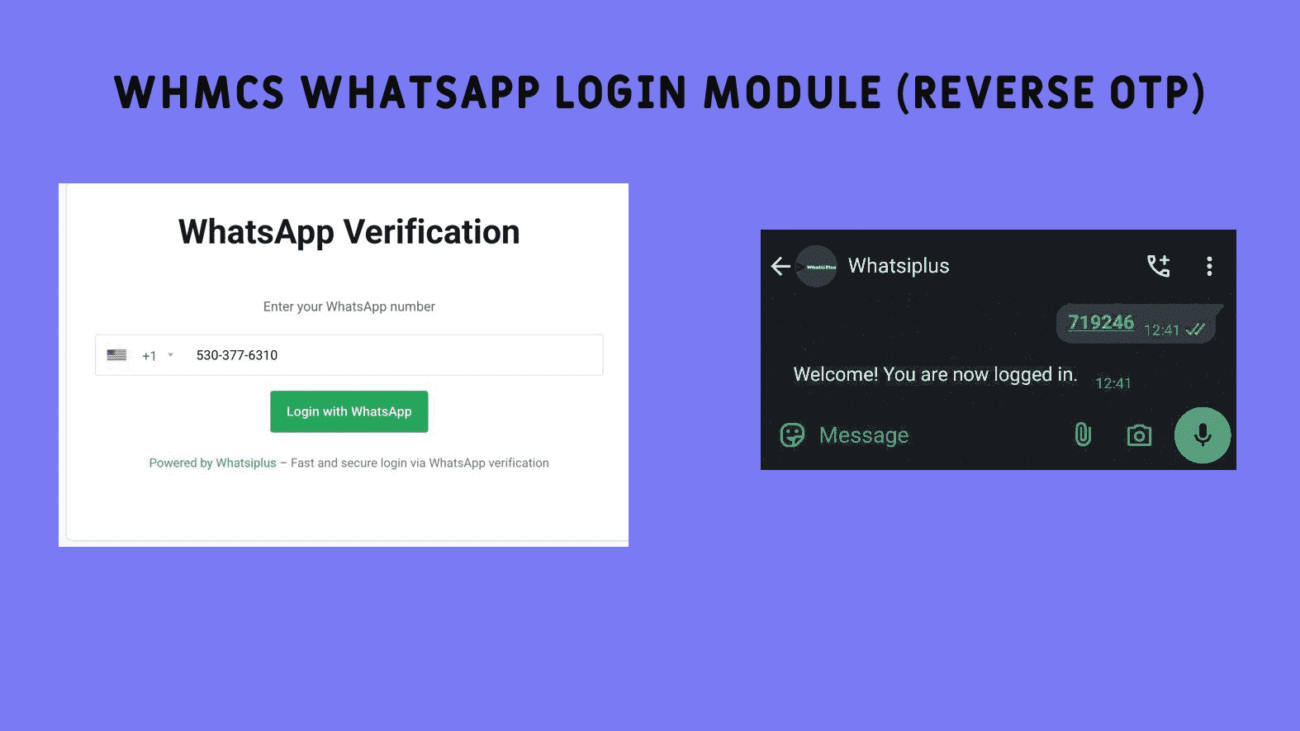
Secure login, password-free with a simple WhatsApp message
Table of Contents
| Title | Description |
|---|---|
| Definition of the WHMCS WhatsApp Login Module | An overview of the module’s functionality and objectives |
| What is Reverse OTP? | Differences compared to traditional OTP |
| Key Benefits of the WhatsApp Login Module | Review of practical features |
| Security in WhatsApp Login Module | Reducing block risk and increasing trust |
| Smooth and Fast User Experience | Password, email & CAPTCHA removal—just one message |
| Significant Cost Reduction | No need for SMS service |
| Module Workflow | Step-by-step usage explanation |
| Custom Welcome Message | Better engagement with users |
| Support for Direct Links & QR Code | More convenience and faster login |
| Detailed Login Reporting | Monitoring module performance |
| Module Installation and Setup | Complete installation guide |
| Technical Support & Updates | Long-term quality and security maintenance |
| Module Use Cases | Use in hosting, e‑commerce, and online services |
| Comparison with Other Login Methods | Precise comparison with email and SMS |
| Mobile UX Optimization | The importance of mobile platform for fast login |
| Legal Compliance Requirements? | Privacy considerations |
| How the OTP is Generated? | Algorithm and code security |
| Automated WhatsApp Message Parsing | Smart text analysis |
| Auto-Response After Successful Login | Interaction without human operator |
| Handling Invalid or Incorrect Messages | Increased accuracy in login |
| Support for Multiple WhatsApp Versions | Desktop, web, and mobile |
| Easy Integration with Other Modules | Compatibility with WHMCS structure |
| Comprehensive Technical Documentation | Admin learning resources |
| Compatibility with Latest WHMCS Versions | Continuous updates per changes |
| Simple UI for Admins | Quick and easy control panel |
| Protection Against Brute Force Attacks | Enhanced login security |
| Successful Customer Experiences | Real user feedback |
| Future of WhatsApp Login Module | Expanding features and capabilities |
WHMCS WhatsApp Login Module (Reverse OTP)
One of the biggest concerns for WHMCS users is login security and ease of account access. With the WHMCS WhatsApp Login Module (Reverse OTP), this challenge is effectively addressed. This innovative module allows users to log in without requiring a password or email, simply by sending a WhatsApp message.
In this new method, there is no need to send OTP via SMS from the site. Instead, the user sends the system-generated code to WhatsApp. This technology is known as Reverse OTP.
What is Reverse OTP?
In the Reverse OTP method, instead of receiving a code from the system, the user must send the code shown to them back via WhatsApp. This process prevents the admin’s number from being blocked by WhatsApp and makes the login flow faster and more secure.
What is WhatsiPlus Service and Its Use Cases?
WhatsiPlus is an advanced and reliable solution for directly integrating WhatsApp with your website or application via API. This platform lets you automatically send or receive WhatsApp messages and implement features like chatbots, WhatsApp-based authentication, and instant notifications into your system.
If you operate an online store, signup platform, booking system, or customer service portal, WhatsiPlus is an essential tool for enhancing communication with users through WhatsApp.
With the WhatsiPlus API, you can:
• Send automated messages like welcome texts, payment confirmations, or order status updates to customers.
• Send smart WhatsApp messages to WooCommerce and WordPress customers regarding their purchase status.
• Receive incoming messages from users, process them, and manage them within your system.
• Enable fast WhatsApp login using Reverse OTP for password-free authentication.
WhatsiPlus not only enhances response speed and communication security but also serves as an excellent alternative to traditional SMS, email, or legacy channels—it’s fast, reliable, and built on the WhatsApp platform that most users have instant access to.
Key Advantages of WHMCS WhatsApp Login Module
- ✅ Password‑free and email‑free login
- 🔁 Reverse OTP (user‑initiated one‑time code): unlike traditional methods, the user sends the message.
- 🔍 Automatic WhatsApp message recognition
- 🔗 Support for direct link and QR Code scanning
- 💬 Custom welcome message sent after successful login
- 📈 Detailed reporting of successful and failed logins
- 🌐 Dedicated page for WhatsApp login flow
Module Workflow
- User initiates a login request.
- The module generates and displays an OTP code.
- The user sends this code via WhatsApp to a designated number (or scans a QR Code using mobile WhatsApp).
- The module verifies the incoming message.
- Upon successful code verification, login is granted.
Module Screenshots Gallery


Frequently Asked Questions
- Is this module free?
Yes, the free version of this module is provided in coded form. - Will WhatsApp block the number?
No, since the user initiates the message, your line will not be blocked. - Which WHMCS versions are compatible?
It’s fully compatible with recent WHMCS versions. - Can login be done using only the WhatsApp number?
Yes, without email, password, or CAPTCHA. - Can a welcome message be sent?
Yes, it can be customized by the admin. - Does it support QR Code?
Yes, both direct link and QR Code are supported.
Why WhatsApp login is superior to email and SMS?
| Feature | Email login | SMS login | WhatsApp Login (Reverse OTP) |
|---|---|---|---|
| Successful delivery | Can be delayed or end up in spam | Often delayed or filtered in many countries | ✅ Accurate, instant, real‑time |
| Cost to site owner | No | Every login incurs a fee | ✅ Completely free; message is sent by user |
| Server load | Requires internal processing | Must interface with SMS APIs | ✅ Zero server load; processed on WhatsiPlus servers |
| Login security | Average; vulnerable to phishing | Depends on phone number security | ✅ Extremely high; OTP is the most secure login method |
| Forgotten credentials issue | Problematic for users | Limited to phone number | ✅ No password or username needed |
| Storing user number | No | No | ✅ WhatsApp number stored via cookie |
| External app login support | No | No | ✅ Usable from mobile app or other platforms |
| Need for CAPTCHA | Yes | No | ✅ Fully CAPTCHA-free |
| Spam/block risk | Moderate | High (bulk SMS) | ✅ No risk of number blocking at all |
| Ease of use | Requires email, password entry, and verification | Requires receiving and entering a code | ✅ Just one click link or QR scan |
| Automatic login | No | No | ✅ Yes, login occurs once OTP is sent |
Unique WhatsApp Login Advantages That No Other Method Offers
The message is sent by the user themselves—meaning no cost for the site owner.
Server load is zero—all verification occurs on WhatsiPlus servers.
Login is extremely fast and secure—user number doesn’t need typing again if stored via cookie.
Login can be triggered from external apps like your mobile app.
No need to solve CAPTCHA or deal with complex verification flows.
Conclusion
The WHMCS WhatsApp Login Module using Reverse OTP transforms user login. This modern approach enhances UX and solves traditional login issues such as spam, forgotten credentials, and high-cost SMS. With this module, users access their account securely and swiftly using just one simple message.
Installation & Download
- Search “WhatsiPlus Login” on the WHMCS marketplace and activate it.
- Alternatively, download directly and copy the “whatsapp_login” folder into your “modules/addons” directory.
- Go to Setup → Add‑ons, select WhatsApp Login, and click Activate.
- After activation, click Settings, assign admin permissions to the module, and save.
- Now, the WhatsApp Login option appears in the Add‑ons menu, where you can customize settings.
Module Activation Guide
- Navigate to Setup > API Credentials & Security > API Roles and click “Add New API Role.”
- Enter a role name (like WhatsiPlus API) and enable the “Authentication” permission.
- Then go to Setup > API Credentials & Security > API Credentials and click “Create New Credential.”
- Assign the created role to the credential and copy the Identifier and Secret values (paste into your login module).
- Go to Setup > Security > API IP Access Restriction and whitelist your server IP.
Note: Whitelist this IP to allow secure API access.
Changelog
Version 1.0.0:
Initial release.